
What to Expect During Credentialing Onboarding
Your credentialing onboarding is managed through your credentialing checklist in your Nourish Provider Portal.
Your checklist includes 6 tasks:
Obtain an NPI (required within 14 days of start date)
Update CAQH (required within 14 days of start date)
Complete the Credentialing Onboarding Form (required within 14 days of start date)
Apply for Washington State Licensure (required within 14 days of start date)
Upload Your Washington State Licensure
Finish Credentialing
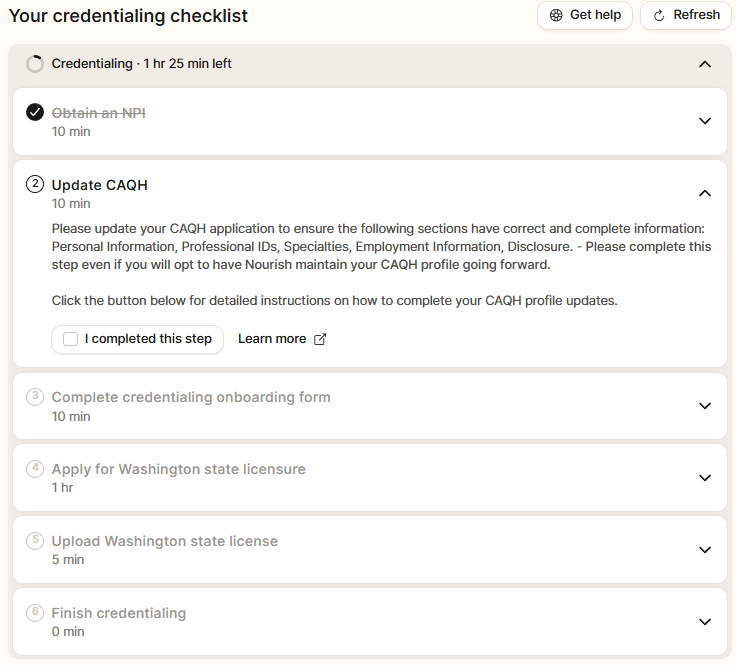
Each task includes a Learn More button that links to detailed help guides with step by step instructions. If you get stuck at any point, please review those guides first.
As you complete each task, be sure to mark it complete on your checklist. Once a task is checked off, you can move on to the next step.
Below is a quick overview of what each step means and what to expect.
Have questions? We're here to help!
Join our live sessions or contact the team for assistance.
Credentialing & Licensing Office Hours | Every Thursday at 4 pm EST. Join us on Zoom by clicking here! |
Credentialing Email | Reach our team at credentialing@usenourish.com! |
1. Obtain an NPI
⏰ Required within 14 days of your start date
Your NPI is your provider identification number.
If you have practiced before, you likely already have one. You can look up your NPI here. If you do not already have one, you can apply for one here. You can also review our NPI help guide here.
If you already have an NPI but need to update your information, you will need to do that through your account with NPPES here.
Once you have your NPI, enter it in the Profile section of your Provider Portal and move on to the next task.
2. Update CAQH
⏰ Required within 14 days of your start date
CAQH is an online profile with your information and Nourish’s information that insurance companies use as your credentialing application.
Learn how to access or register your account here.
If you run into errors registering or accessing your account, you'll need to contact CAQH support.
STOP!
CAQH may look like a lot, but don't worry! You are only responsible for a few required sections with your information. It does not need to be perfect. We have walk through guides, and we are here to help.
Please complete or review these sections:
Personal Information, Professional IDs, Education & Professional Training,
Specialties, Employment Information, Disclosure
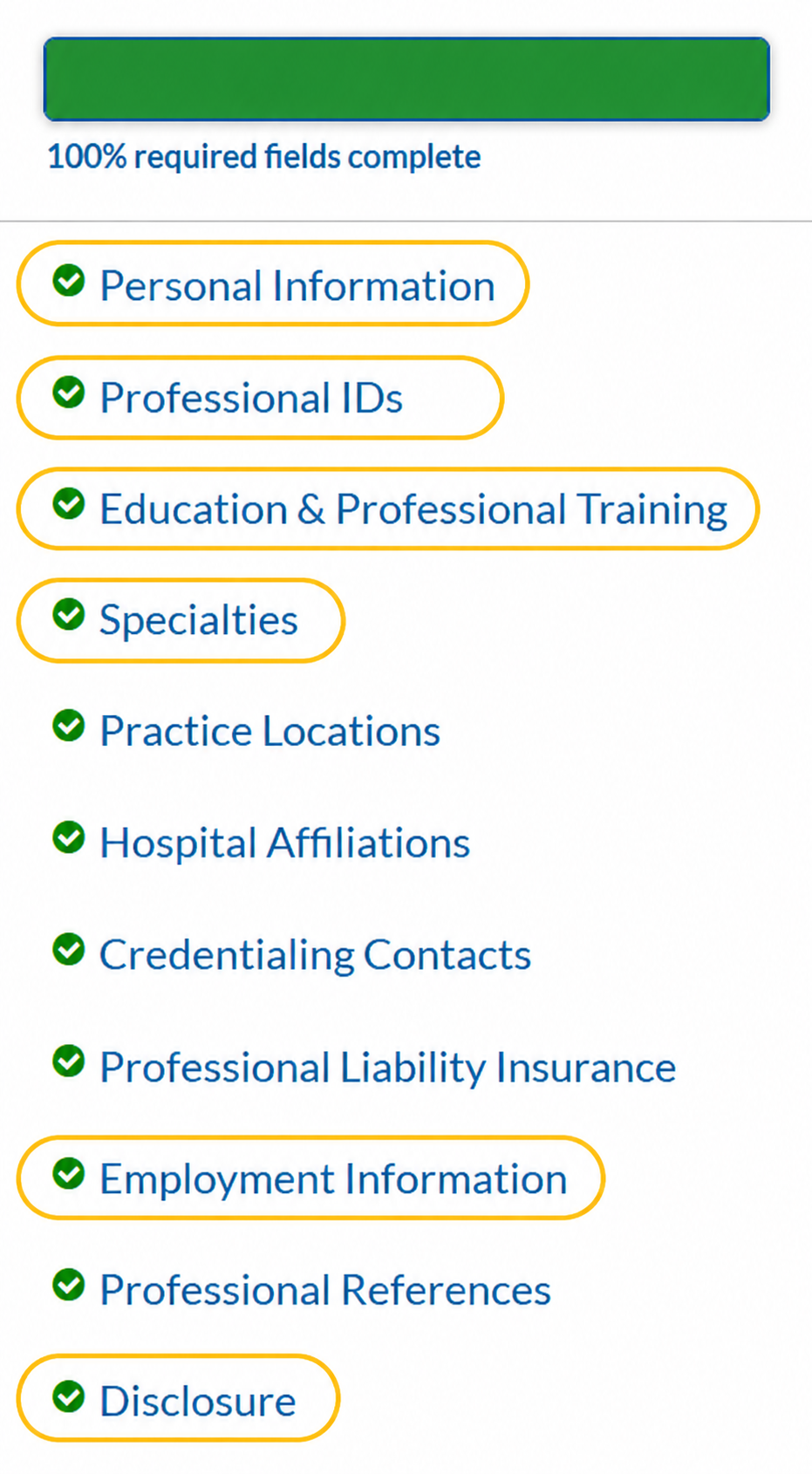
You do not need to attest or finish your full profile right now. Once your sections are complete, you can log out. Your information will save.
What about the remaining sections?
In the next step, you’ll choose how the rest of your CAQH is completed.
You can have Nourish complete the rest for you, or choose to do it yourself.
You will make your selection as part of the Credentialing Onboarding Form.
Continue to the next step to make your selection.
You can learn more here.
3. Complete the Credentialing Onboarding Form
⏰ Required within 14 days of your start date
Credentialing Onboarding Form is a brief online form that you can access directly from the task in your checklist.
The form asks for basic information and requires you to upload your resume.
As part of this form, you will also enter your CAQH login information and select whether you want Nourish to handle CAQH updates for you.
Once the form is complete, mark the task complete and move to the next step.
4. Apply for Washington State Licensure
⏰ Required within 14 days of your start date
Washington licensure is required as part of Nourish credentialing so we can credential you through our major contracts and and support patient access across our network.
Please review our Washington licensure guide here before starting your application. You can begin your Washington licensure application here.
The application is completed online, fingerprints are required, and processing typically takes 6–10 weeks.
The Washington licensure guide includes detailed, step by step instructions for completing this process.
5. Upload Your Washington State Licensure
Once your Washington license has been approved, upload it in your Provider Portal under the Licensure tab.
You will enter your license details and upload proof of licensure:
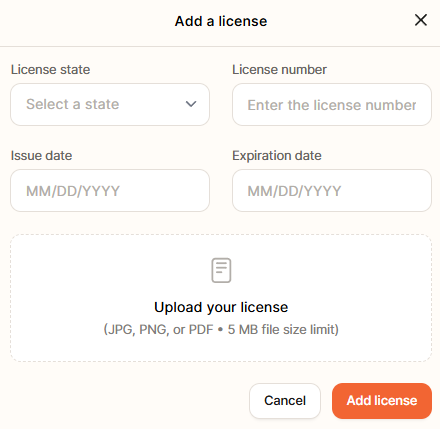
Proof of licensure can be a printout from the Washington verification website. You can verify your license here.
Once uploaded, mark the task complete and move on.
6. Finish Credentialing
Once all checklist items have been completed, you can complete the final task and finish your credentialing onboarding.
That’s it — once everything is checked off, you’re done.
Thank you for taking the time to complete your credentialing onboarding.