
CAQH Profile Section Reference
This page provides guidance on completing your CAQH profile, broken down by individual section. Each section includes step-by-step instructions and a Scribe walkthrough.
✅ Personal Information
This section collects your basic demographic details, like your full legal name, Type 1 NPI, and date of birth. It also includes your practice states.
Additional states may need to be added as we credential you. Adding a new state can trigger required questions and documents within your CAQH profile.
📸 Make sure these fields are completed exactly as shown to avoid credentialing issues:
NUCC Grouping: Dietary & Nutrition Service Providers
Provider Type: Dietitian
Practice Setting: Inpatient/Outpatient or Outpatient Only
Practice State: Washington (or the state(s) where you’re licensed)
✅ Professional IDs
This is where you’ll enter a license number for each Practice State you listed in your Personal Information section. You must include a license for every state you listed.
If a state doesn’t require licensure (like CO), you still need to list something—enter your CDR number instead of a license.
Licensing is the only part of this page you need to fill out—you can leave the rest (like CDS Registration) blank.
🔍 Heads up: Sometimes states like TX or NJ may appear even if you’re not licensed there—this is okay and may mean we submitted credentialing on your behalf to a payer in that state.
✅ Specialties
This section confirms your professional focus and board certification.
You’ll enter:
Primary Specialty: Registered Dietitian
Name of Certifying Board: Commission on Dietetic Registration (CDR)
Certification Number: Your CDR certificate number
Effective Date / Expiration Date: Use the dates from your CDR profile or card
✅ That’s all you need! You do not need to enter any additional specialties or certifications.
Nothing else on this page is required—feel free to leave the rest blank.
✅ Education & Professional Training
This section asks for your academic background. Providers only need to enter two things:
Your Bachelor’s degree
Your Graduate degree, if applicable (e.g., MS in Nutrition)
🗓️ For all dates, just enter the month and year—you don’t need the exact day.
You do not need to include your internship or get overly detailed. Keep it simple!
📸 Insert screenshot showing example entries for BS and MS degrees
💡 Why this matters:
CAQH now links your entries in this section to the Employment Information section.
Payers require an explanation for any employment gaps longer than 60 days, and your education records help automatically fill those gaps.
✅ Practice Locations
This is where you will list the Nourish practice locations for the states where we have or will be credentialing you, even if services are provided via telehealth. It’s important this section is accurate—errors can cause delays or rejections.
You may notice locations in states you’re not licensed in—this is normal. It means we’ve submitted credentialing on your behalf in that state. If licensure isn’t required there, we’ll list your CDR under Professional IDs instead.
💡 We prefer Washington be set as the Primary Practice Location.
You may see this switched at times—this is also normal and usually because a payer requires that location listed as primary to initiate the credentialing application.
✅ If you have a private practice or are affiliated with another group, that is completely fine! CAQH allows for multiple practice locations and group affiliations. You do not need a separate CAQH profile for different practices.
📌 Most Common Nourish Practice Locations
State | Address | Phone | Fax |
|---|---|---|---|
Washington (Primary) | 221 1st Ave W Ste 200 Seattle, WA 98119 | 512-693-7045 | 512-399-9039 |
Oregon | 10260 SW Greenburg Rd # 4 Portland, OR 97223 | 512-693-7045 | 512-399-9039 |
Texas | 3724 Jefferson St Ste 104 Austin, TX 78731 | 512-693-7045 | 512-399-9039 |
Colorado | 250 Fillmore St Unit 150 Denver, CO 80206 | 512-693-7045 | 512-399-9039 |
Montana | 5 W Mendenhall St Ste 202 Bozeman, MT 59715 | 512-693-7045 | 512-399-9039 |
🏢 Nourish Practice Details
Group Name: Nourish, Inc.
TIN: 853953549
Group NPI: 1558097824
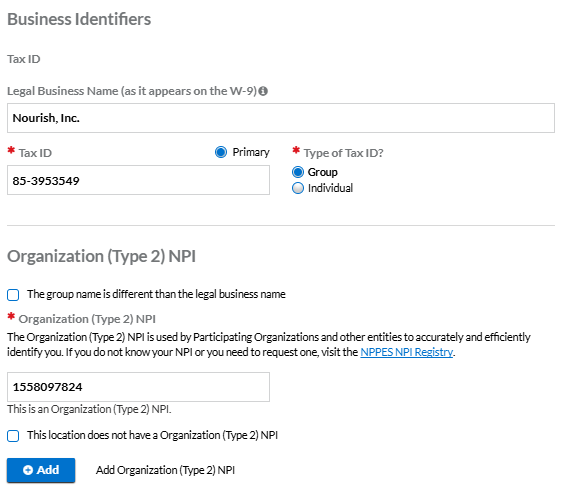
Mailing / Billing / Remittance Address:
500 Westover Dr #19431
Sanford, NC 27330-8941 (Lee County)Under Office Personnel, you can enter:
Name: Stephen Beard
Email: credentialing@usenourish.com
📝 Key Tips
You can only mark one location as “Primary.”
Once your first location is set up correctly, use the “Copy practice details from another location” feature when adding new locations.
You’ll be asked to update the address for the new state—but all other details will transfer over directly.
✅ Hospital Affiliations
You can skip this section.
🛑 Not required. Leave the entire section blank.
✅ Credentialing Contacts
This section tells insurance companies who to contact if they have questions about your application. You can use the following information when completing this section in CAQH:
Field | Entry |
|---|---|
First Name | Stephen |
Last Name | Beard |
Street | 3724 Jefferson St Ste 104 |
City / State / Zip | Austin, TX 78731 |
Phone | 512-693-7045 |
Fax | 512-399-9039 |
Primary Contact | Yes |
✅ Professional Liability Insurance
This section shows proof of your malpractice coverage. Nourish provides full coverage for all RDs, so you’ll enter the information for our group policy.
What to Enter
Field | Entry |
|---|---|
Policy Number | HC7BADE3WY001 |
Covered Practice Location | Nourish, Inc. |
Current Effective Date | 11/10/2025 |
Current Expiration Date | 3/1/2027 |
Carrier/Self Insured Name | Lockton Companies, LLC |
Amount of Coverage per Occurrence | $1,000,000 |
Amount of Coverage Aggregate | $3,000,000 |
Do you have unlimited coverage with this insurance carrier? | No |
Individual Coverage | No |
Self Insured | No |
✅ You can leave everything else on this page blank—including address, phone number, and tail/nose coverage questions.
➡️ Make sure to also upload the certificate under the Documents tab.
✅ Employment Information
Please complete a full 10-year employment history. Payers require this to approve your credentialing applications. Even small gaps can delay processing.
⚠️ Incomplete work history will lead to follow-up requests and slow down approval.
Make sure to list Nourish, Inc. as your current employer.
Gaps in Employment?
If you had a gap longer than 60 days, add a gap record:
In the Gap Explanation box, write:
Worked in non-healthcare fieldorOtherMake sure the dates match the length of the gap
✅ Professional References
You can skip this section.
🛑 Not required. Leave the entire section blank.
✅ Disclosure
📝 Everyone must complete the CAQH Disclosure section. Some states also include additional disclosures that appear as tabs along the top of this section in CAQH. These include:
Oregon (OR)
Minnesota (MN)
North Carolina (NC)
Washington (WA)
Texas (TX)
This section includes a series of required yes/no questions about your background.
🛑 Answer all questions truthfully. If you answer “Yes” to any question, a text box will appear and you must provide a brief explanation.
There are no optional questions in this section.
✅ Oregon Disclosure – Question L
"Do you attest to no current physical, mental health, or chemical dependency conditions (alcohol or other substances) that currently affect your ability to practice, with or without reasonable accommodation?"
You should answer Yes if you do not currently have any condition that affects your ability to practice safely.
This question is not asking if you’ve ever had a condition—only whether one is actively impacting your practice now.
✅ Authorization
This section lets payers access your CAQH profile for credentialing.
When asked:
“When a healthcare organization subscribes to your data, should CAQH automatically authorize access?”
✅ Select “Yes”
Then check the box and click Save.
✅ Documents
After you review and attest your profile, you’ll be prompted to upload your documents.
📌 Note: If you are setting up your profile for the first time, you will not be able to access the Documents section until your profile has been fully completed and attested for the first time.
If you’ve selected Oregon correctly as a practice state and listed the practice location, you’ll have three required documents to sign and upload. These apply to all users. If you’ve added additional practice states, there may be additional state-specific documents to complete as well.
The Three Standard Required Documents:
Authorization Attestation and Release
A simple, quick download. Enter your name, add the date, and sign—it can be done electronically.Oregon Authorization and Release Form
Same process: download, sign, upload.Oregon Disclosure
This is auto-filled based on your answers in the Disclosure section. You'll just need to sign and date it.
All required state-specific forms are available in the CAQH Document Library at the bottom of the guide.
Why did my document fail?
A document may fail for common reasons such as being incomplete (e.g. missing a signature or a date) or illegible.
Hover on the ℹ️ informational icon next to your document status in CAQH to view the reason for failure.
How do I use the “Document Actions” column?
The Document Actions column allows you to complete available tasks on each document:
Download: Download a document that requires your signature
Upload: Upload a document that is missing from your CAQH provider profile
Delete: Delete a document from your profile (cannot be undone once confirmed)
Replace: Replace a failed or expired document from your profile